Product Strategy UX/UI Design Smart Home Mobile App

Smart Home Voice Assistant

Led the UX/UI design of Panasonic Simpli-Fi — a connected voice assistant that simplified home automation and grew its users by 10%.
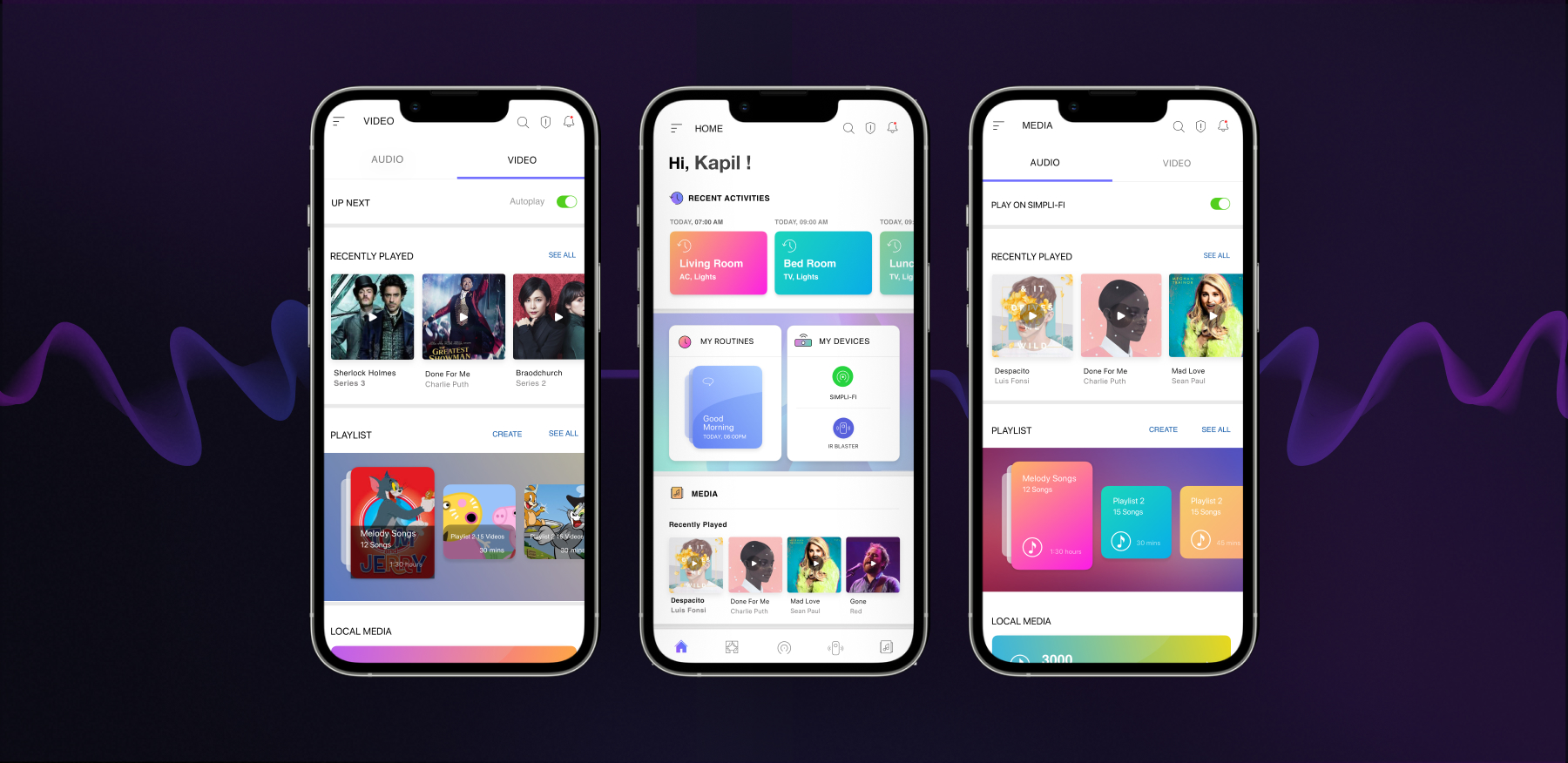
Project Overview

My role: Lead Product Designer

Panasonic Simpli-Fi is a smart home and lifestyle ecosystem that empowers users to control and monitor connected devices — lights, appliances, cameras, and vehicles — all through a unified voice-enabled mobile app.
Beyond home automation, Simpli-Fi brings entertainment and daily convenience together, \allowing users to listen to music, watch videos, and create personalized daily routines — blending productivity, comfort, and joy into one seamless experience.
Challenges

Users managing multiple smart devices often faced fragmented experiences — juggling separate apps for lighting, appliances, and media. Panasonic aimed to redefine the connected-home experience with a single intelligent interface that integrated entertainment, automation, and security, while remaining simple and human-centred.

Duration

  • 4 Months

Collaboration

  • Business Stakeholder
  • Product Manager
  • UX Researcher
  • Development Team

Tools

  • Sketch
  • Invision
  • Adobe Photoshop
  • Miro
  • Jira
  • Confluence

Research & Discovery

Discovery:

  • Partnered with cross-functional teams to define vision, user needs, and technical constraints.
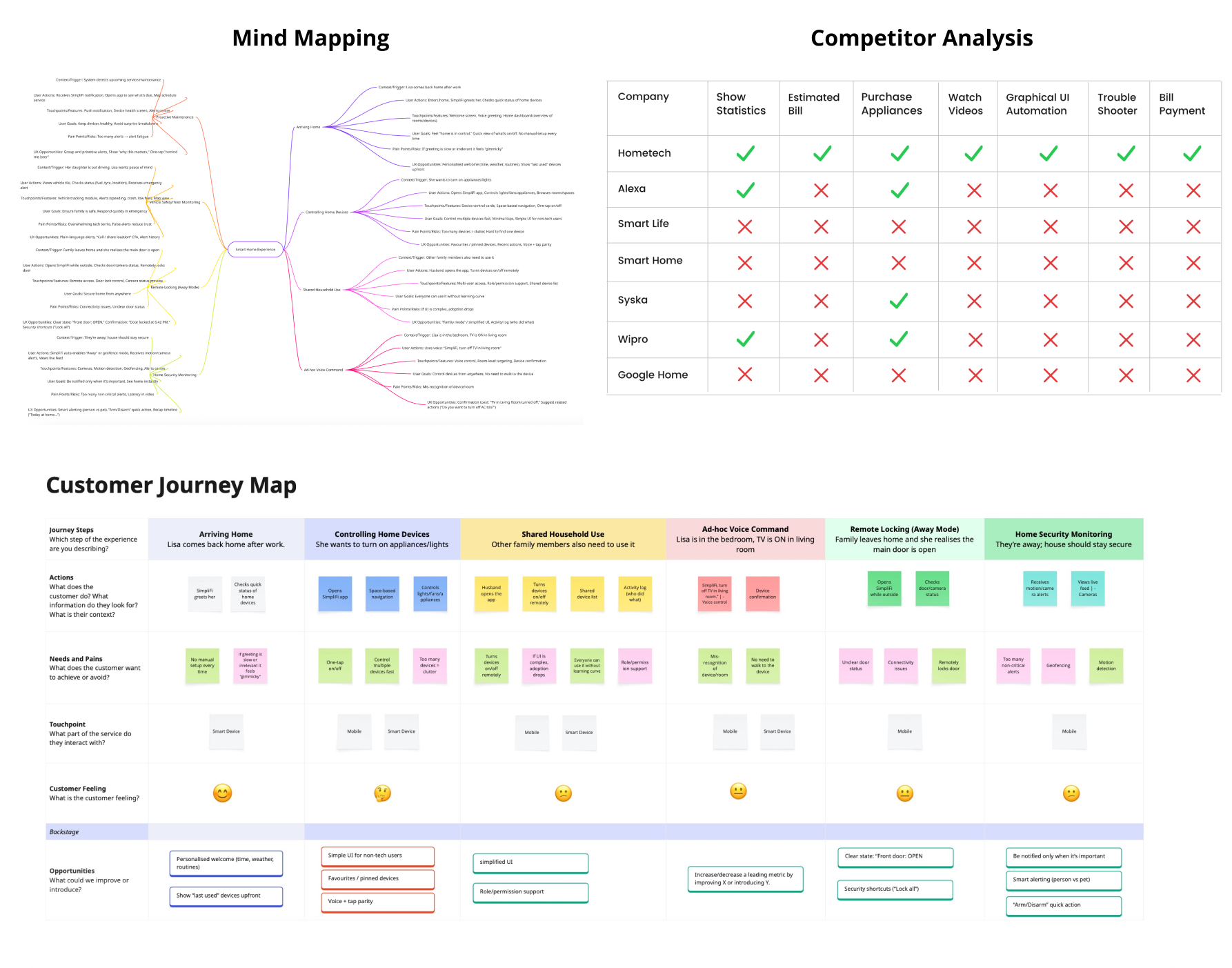
  • Conducted competitive benchmarking against Alexa, Google Home, Syska Smart, and Smart Life to identify gaps in user control and entertainment features.
  • Developed key personas representing homeowners, families, and tech-savvy users seeking connected lifestyles.

Journey mapping highlighting contextual use cases:

  • Returning home and activating a “Welcome” routine
  • Streaming music or video while controlling lights or temperature
  • Receiving safety notifications while away from home

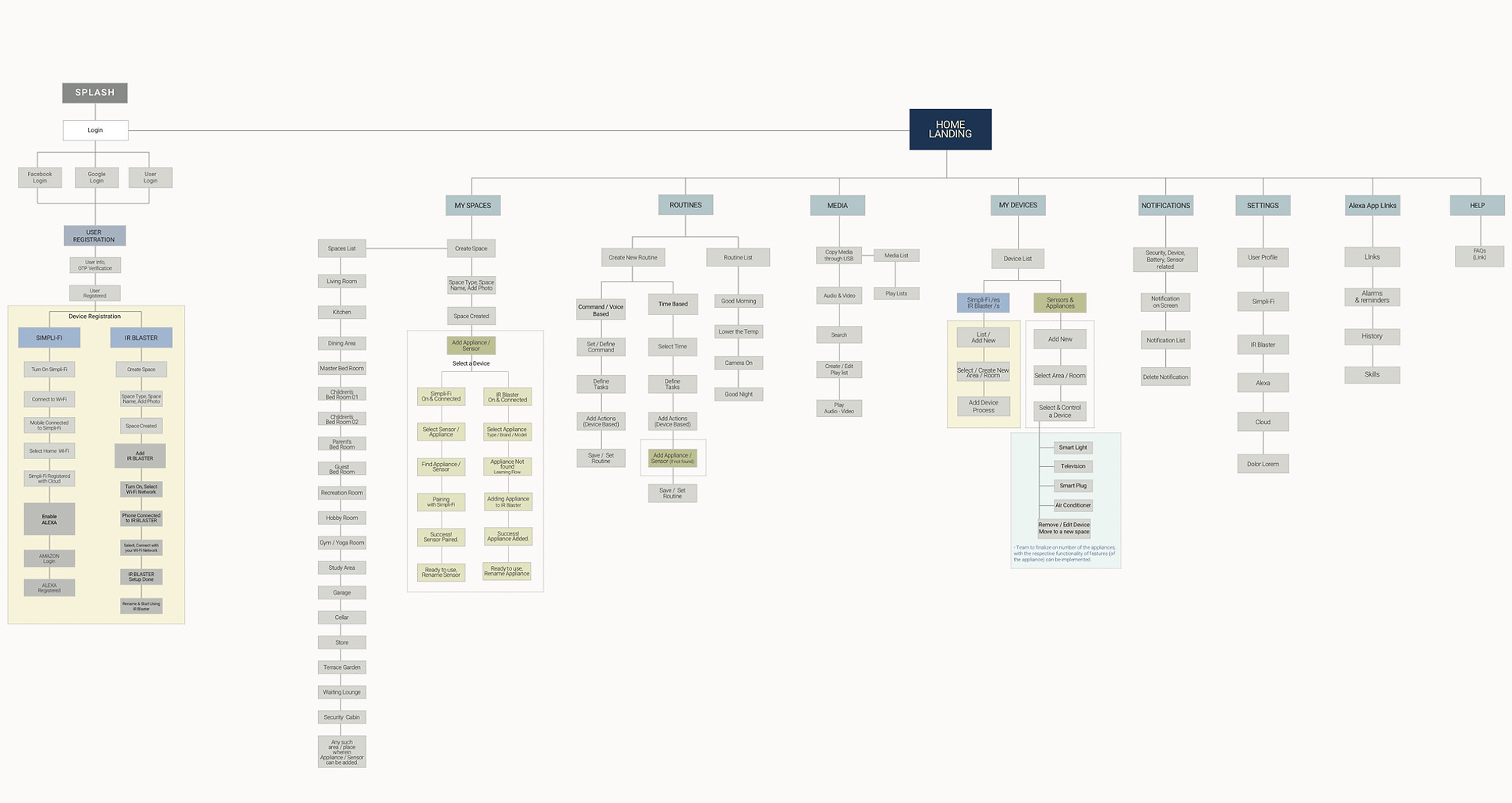
Information Architecture

Constructed information architecture grouping smart devices, entertainment, and routines into intuitive sections. Outlined flows for device setup, media playback, routine creation, and security management. Prioritised discoverability and simplicity, ensuring key actions (play, control, automate) were accessible within two taps.
Hypothesis & Goals

Users managing multiple smart devices often face fragmented experiences and inconsistent control patterns across apps.

Unified Control Improves Trust

Users will feel greater confidence when they can control all devices — appliances, lights, vehicles, and cameras — through a single, coherent interface.

Entertainment Builds Habit Formation

Integrating music and video playback within the same ecosystem will increase daily engagement and session time, transforming Simpli-Fi from a utility tool into a lifestyle companion.

Personalized Automation Drives Delight

Allowing users to create “routines” (e.g., Good Morning, Movie Night) will strengthen emotional connection and perceived convenience, improving user satisfaction.

Transparency Enhances Security Perception

Real-time alerts, status feedback, and confirmation messages will make users feel informed and secure — reducing anxiety about smart-home reliability.

Brainstroming & Ideation

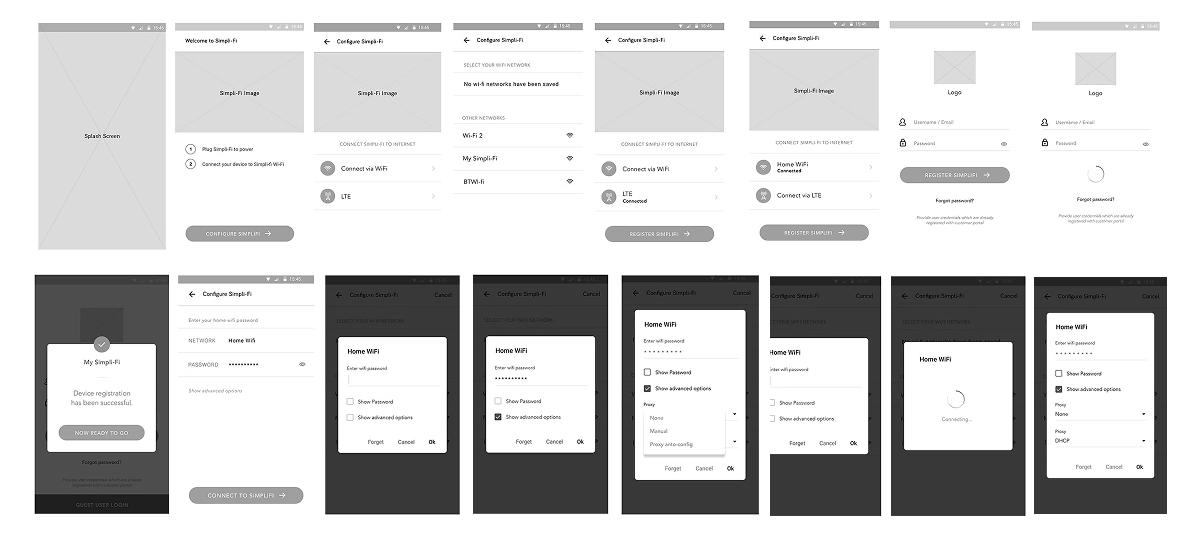
Based on the discovery & research insights, I conducted brainstorming sessions to explore multiple design concepts addressing key user pain points. These collaborative sessions involved close discussions with stakeholders, ensuring that business goals and user needs stayed aligned. Through this iterative process, several wireframe ideas were developed, refined, and validated collectively—forming the foundation for the final design direction.
Design Logic and Key Considerations

  • Ease of Use: Simplify the control of multiple devices into an effortless, two-tap or one-voice experience.
  • Engagement: Encourage daily interaction through integrated media and automation features.
  • Scalability: Create a flexible design system adaptable to future devices and services.
  • Delight: Make the interface visually calm, emotionally warm, and responsive to user context.
  • Trust & Safety: Build transparency through consistent feedback, clear alerts, and privacy-first design.

Visual Design

The app’s interaction and visual design were guided by usability principles:
  • Fitts’s Law: Optimised touch zones for easy one-handed control.
  • Chunking: Grouped related actions (music, video, automation) to minimise cognitive load.
  • Forgiveness: Enabled quick undo and back navigation for effortless exploration.
  • Aesthetic-Usability Effect: Bold colours, minimal typography, and familiar iconography built comfort and trust.
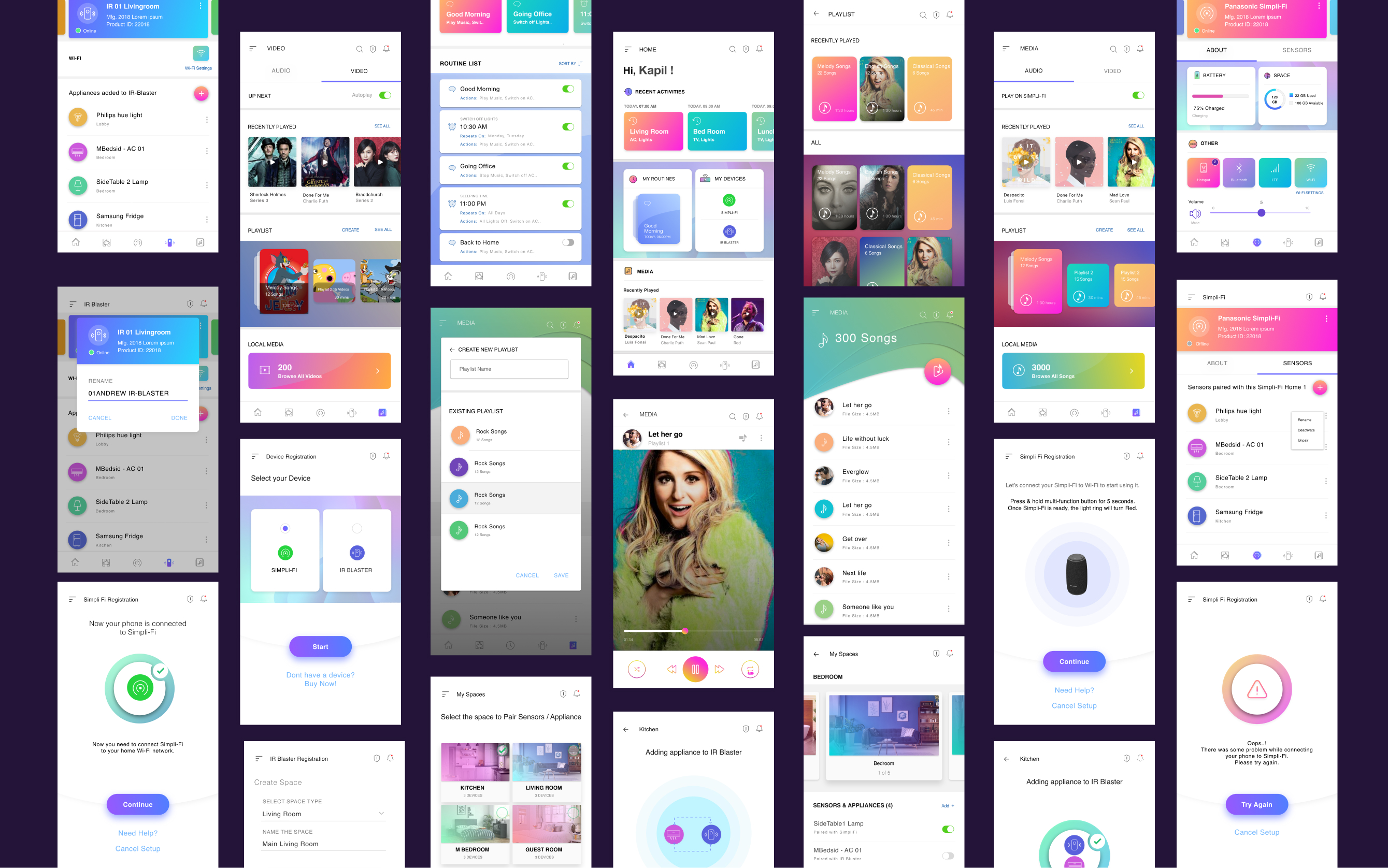
  • Home Dashboard: Unified command centre displaying connected spaces, active routines, and quick media controls.
  • Entertainment Hub: Integrated player for streaming music and videos with voice and gesture support.
  • Routine Builder: Drag-and-drop interface to create daily or custom routines (e.g., “Wake Up,” “Leaving Home”).
  • Security Monitor: Real-time feed for cameras, motion alerts, and geofence notifications.

Results & Impact

After monitoring website performance for one month after the launch. The redesigned experience led to measurable improvements in user satisfaction and business metrics.

10%
Growth in active users
90%
Success rate across all key flows
50%
Reduction in customer support calls
50%
Decrease in manual re-issuance

Let's Work Together

I'm always interested in discussing new opportunities, collaborating on exciting projects, or simply sharing ideas about design.

💬

Start A Conversation

Ready to elevate your digital experiences? Let's discuss your project and explore how we can work together.

Schedule a Call
✉️

Send an Email

Prefer email? Drop me a line and I'll get back to you within 24 hours. I'd love to hear about your project.

Send Email